Skip to content
BTNOMB / A guide to trading on GDEX

Your next move.
One trading workspace.

Explore on-chain tokens, perpetuals, and agent tools in GDEX. Get a clear path from setup to your first trade—without piecing it together across a dozen tabs.

Opens gdex.pro through our referral link. We may earn a commission. Trading involves risk of loss. Read the disclosure.

INSIDE GDEXProduct screenshot · not live
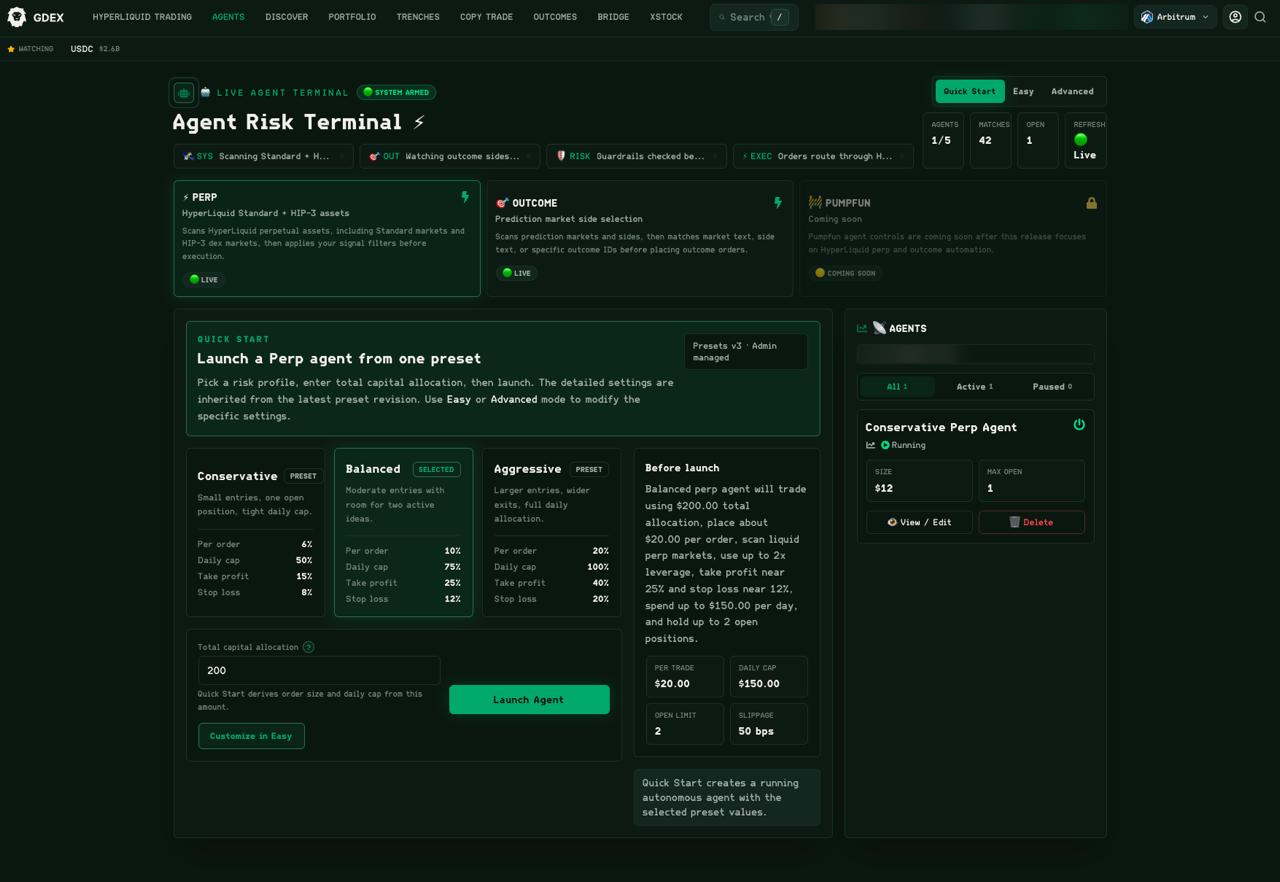
GDEX Agent Risk Terminal showing risk presets, capital allocation, and an agent management panel.
Existing GDEX interface capture. Settings shown are examples, not recommendations. The product may change. View full size ↗
CONTROL BEFORE CAPITAL

Understand the allocation, leverage, and exit settings before you enable an agent.

01 / Discover On-chain tokens02 / Fund Crypto & on-ramp options03 / Trade Spot & perpetuals04 / Configure Agent risk controls
Less guesswork. More context.

A terminal is a tool.
You set the limits.

GDEX brings multiple trading workflows into one interface. BTNOMB helps you understand what each one does—and what to check before you put funds at risk.

Read the GDEX walkthrough ↗
01

Find the token. Verify the details.

Use token search and network selection to find your market. Check the contract address, chain, liquidity, and order cost before placing a trade. A familiar ticker is not proof of identity.

How to verify a contract address ↗
02

Choose your funding route.

Deposit crypto or explore the available third-party purchase options. Apple Pay and card availability, identity checks, fees, and limits depend on your region and the provider.

Explore funding with Apple Pay ↗
03

Understand automation before enabling it.

The agent interface exposes presets and allocation controls. Review every setting: a preset called “Conservative” can still lose money. Perpetuals add funding costs and liquidation risk.

Understand GDEX risk presets ↗
Your first session

Start with a plan.
Not a position.

No rush to place an order. Set up access, check your funding route, and understand the trade before you confirm it.

  1. STEP 01 / ACCESS

    Open GDEX. Secure access.

    Follow the sign-in flow on gdex.pro. Review the wallet and recovery options, secure your login, and never share your private key. Read the security basics.

  2. STEP 02 / FUND

    Check the chain. Start small.

    Confirm the destination address and network before a deposit. Leave room for network fees and consider a small test transfer. For card purchases, inspect the provider’s final quote.

  3. STEP 03 / REVIEW

    Set a limit before a trade.

    Verify the token, fees, slippage, and order size. Decide what you can afford to lose. Avoid leverage or automation until you understand how they work. Use the first-trade checklist.

You are opening a third-party trading platform, not placing an order here. Product availability and terms are set by GDEX and its providers.

Open GDEX
The field guide

Do the homework.
Then make your move.

Practical guides for the decisions that matter: custody, funding, costs, and risk.

Start here / Platform walkthrough

Is GDEX the right workspace for you?

Walk through the interface, funding options, and trading workflows. Understand the trade-offs before deciding whether to use the platform.

Read the GDEX review ↗
Before you connect

Clear answers.
No shortcuts.

Is BTNOMB the trading platform?

No. This is a BTNOMB guide to GDEX. Trading takes place on gdex.pro, not on this site. Links labelled “Open GDEX” or “Explore GDEX” use our referral redirect, and we may earn a commission from referred activity.

Do I need to deposit money to explore?

You can read our guides and view the interface screenshot without funding an account. Opening the GDEX link does not place a trade or move funds. Check GDEX’s current requirements before using a trading feature.

Can I use Apple Pay without identity checks?

Do not assume that you can. Apple Pay is a payment method, not an exemption from identity verification. Third-party purchase providers may require KYC and apply regional restrictions, minimums, and fees. Read the funding guide.

Does self-custody mean my funds are safe?

No. Self-custody does not remove phishing, wallet-access, smart-contract, market, or execution risks. Understand the wallet’s recovery and key-management model, protect your login, and check permissions before signing. Review wallet security.

Are agent presets or copy trading guaranteed to profit?

No. Automation can execute losing trades, and copying a wallet does not reproduce its entry price or results. Risk settings do not guarantee a maximum loss; markets can gap and orders may not execute as expected. Leveraged positions can be liquidated.

What fees should I check?

Review trading fees, network costs, spread, slippage, and any on-ramp or bridge charges. Perpetual positions may also incur funding payments. The final quote and current provider terms take precedence over any guide. Read the fee breakdown.

Ready when you are

Know the tool.
Own the decision.

Explore GDEX, review the settings, and decide if it fits your trading process. Your first move can simply be learning the interface.

Explore GDEX

Referral link · Trading involves risk.
No returns or outcomes are guaranteed.