The memecoin market moves fast. New tokens launch every minute, trends shift in hours, and the difference between catching a 10x and buying the top often comes down to timing and data analysis that's impossible to do manually at scale.
That's the thesis behind GDEX Pro's AI copy trading feature: instead of trying to analyze every new token yourself, you can mirror the trades of AI agents that scan on-chain data 24/7, identify patterns, and execute autonomously. You allocate capital, set your risk parameters, and the agent's trades are mirrored into your self-custody wallet automatically.
This guide explains what AI agent wallets are, how they work on GDEX Pro, and how to set up copy trading step by step.
What Are AI Agent Wallets?
AI agent wallets are on-chain wallets controlled by autonomous trading algorithms. Unlike traditional trading bots that follow simple rules (buy when RSI is below 30, sell when it's above 70), these agents use machine learning models to analyze multiple data streams simultaneously:
- On-chain data: Token liquidity, holder distribution, wallet clustering, smart money movements
- Social signals: Twitter/X mentions, Telegram group activity, sentiment analysis
- Market microstructure: Order flow, buy/sell pressure, volume patterns, price momentum
- Cross-chain context: What's happening on Ethereum and Base that might impact Solana
Each agent has its own trading strategy, risk profile, and specialization. Some focus on early memecoin entries, others on momentum plays, and others on more conservative token picks. GDEX Pro currently supports 5 AI agent slots, each with a visible on-chain track record.
Why Copy AI Agents Instead of Human Traders?
Copy trading has existed in crypto for years — platforms like BullX and others let you follow human wallets. But AI agents have several structural advantages:
- No sleep, no emotion: AI agents trade 24/7 without fatigue, FOMO, or panic selling. They execute their strategy consistently, even at 3 AM when the market is chaotic.
- Speed of analysis: An AI agent can evaluate thousands of new tokens per hour, checking liquidity, holder patterns, and social signals simultaneously. A human trader might research 5-10 tokens in the same period.
- Consistent risk management: Agents follow pre-programmed risk parameters. They don't "go degen" on a hunch. If a trade hits the stop-loss, they exit. If the position sizing rules say 2% of portfolio, that's what they allocate.
- Transparent track record: Every trade an AI agent makes is on-chain and verifiable. You can see their full history, win rate, average return, and drawdowns before deciding to copy them.
How to Set Up Copy Trading on GDEX Pro
GDEX Pro is actively developed and its screens change between releases, so these steps describe the flow rather than a fixed layout. Element names may differ slightly from what you see — the order of operations is what matters.
Sign In to GDEX Pro
Go to gdex.pro and sign in with Google or Apple. If this is your first time, GDEX will create a self-custody wallet for you automatically. Make sure you have SOL in your wallet — you can deposit with Apple Pay if you need to fund it.
Navigate to the Agent Risk Terminal
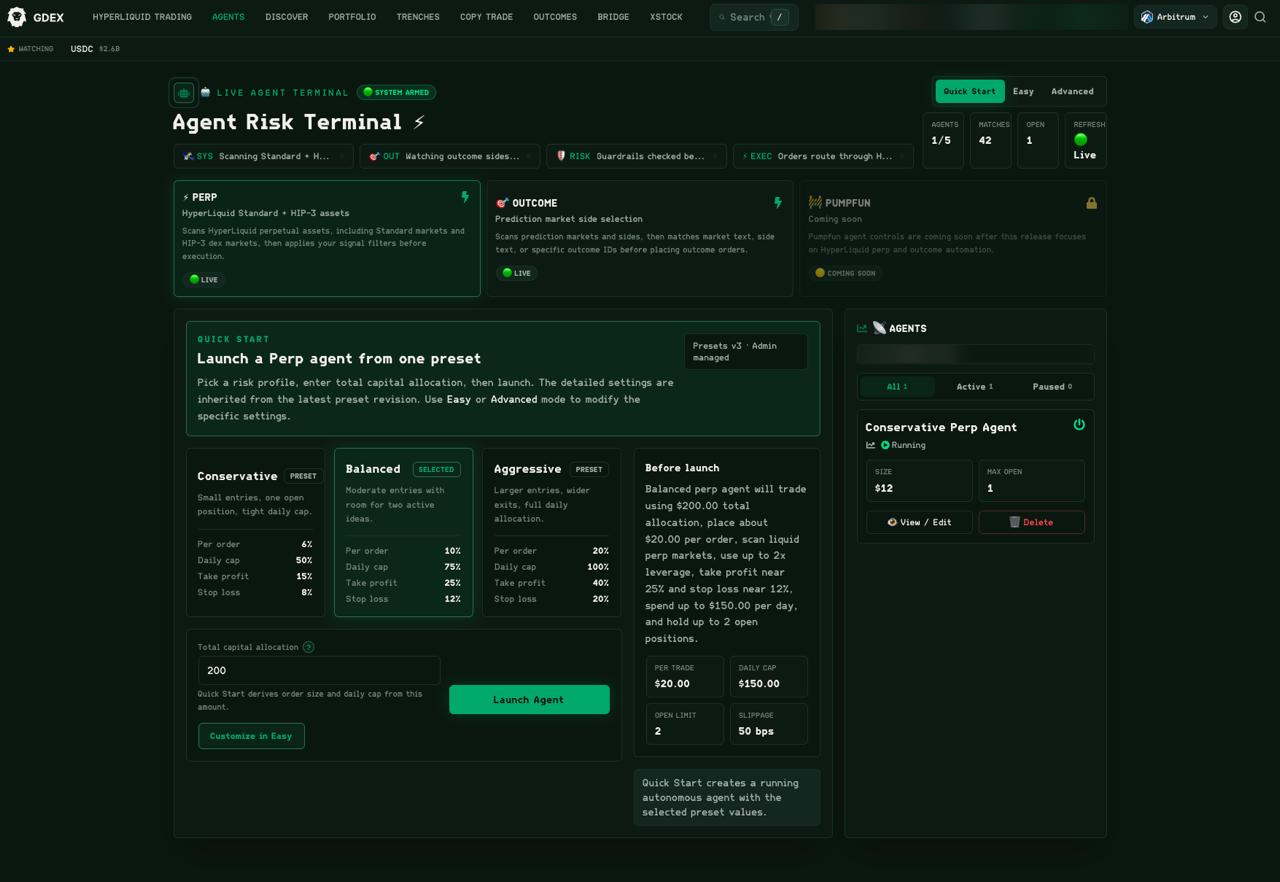
Open the agents section in the GDEX interface. The screen is titled Agent Risk Terminal, and it is where you launch an agent, set its risk limits, and watch what it is doing. Three mode tabs sit at the top right — Quick Start, Easy and Advanced — alongside counters for AGENTS, MATCHES and OPEN. The AGENTS counter shows how many slots you are using out of the five available.
Review Agent Performance
Before copying any agent, review their track record carefully. Look at:
- Win rate: What percentage of their trades are profitable?
- Average return per trade: Not just the winners — the average across all trades.
- Max drawdown: The largest peak-to-trough decline. This tells you the worst-case scenario so far.
- Recent activity: Is the agent actively trading? When was the last trade?
- Strategy type: Does the agent focus on early entries, momentum, or conservative plays? Match this to your own risk tolerance.
Set Your Allocation
Choose how much SOL to allocate to copy trading. This is the pool of capital the system will use to mirror the agent's trades. You can start small — even 0.5 SOL — to test the system before committing more. Set your maximum position size and any additional risk parameters the platform offers.
Enable Copy Trading
Toggle on copy trading for your selected agent(s). From this point, whenever the agent executes a buy, the system will mirror a proportional trade in your wallet. When the agent sells, it sells your position too. All trades execute in your self-custody wallet — the agent never has access to your funds.
Monitor and Adjust
A running agent appears in the AGENTS panel down the right-hand side of the terminal — the screenshot above shows one named Conservative Perp Agent with a Running status, its SIZE and MAX OPEN values, and View / Edit and Delete controls. That panel also filters by All, Active and Paused. Use View / Edit to change an allocation, or Delete to remove the agent entirely.
Important Things to Know
Your funds stay in your wallet
This is critical and worth emphasizing: copy trading on GDEX does not require you to deposit funds into a separate pool or give anyone access to your wallet. The trades execute in your self-custody wallet. You can withdraw your funds at any time. The agent doesn't hold your money — it just signals what to buy and sell, and the system mirrors those signals.
Past performance is not guaranteed
AI agents can have losing streaks just like any trader. A 70% win rate doesn't mean the next trade will be profitable. Start with a small allocation, observe the agent's behavior across different market conditions, and only increase your allocation once you're comfortable with the risk profile.
You can copy multiple agents
Diversifying across 2-3 agents with different strategies can reduce your overall risk. If one agent has a bad week, the others may compensate. Just make sure your total allocation across all agents doesn't exceed what you can afford to lose.
Slippage and timing
Your copy trade executes slightly after the agent's trade, which means you may get a slightly different price. On highly liquid tokens, this difference is negligible. On low-liquidity memecoins, the slippage can be more significant. The system accounts for this by using optimized routing, but it's worth being aware of.
Who Should Use AI Copy Trading?
- New traders who want market exposure without doing deep research on every token
- Busy traders who can't watch charts all day but want to stay in the market
- Experienced traders who want to diversify with an automated strategy alongside their manual trading
- Anyone curious about AI-driven trading — starting with a small allocation is low-risk way to learn
Bottom Line
GDEX Pro's AI copy trading feature is one of its most unique differentiators. No other major Solana trading terminal offers autonomous AI agent wallets that you can mirror into a self-custody wallet. It's not a guaranteed profit machine — nothing in crypto is — but it's a powerful tool for traders who want to leverage AI analysis without giving up control of their funds.
Start with a small allocation, pick agents whose strategies match your risk tolerance, and let the bots work while you sleep.
Up to 5 AI agent slots. Self-custody. Start with as little as 0.5 SOL.