Token sniping on Solana means getting into a newly launched token as close to the moment of liquidity as possible — before price discovery drives the chart vertical, or before you realize it was a rug. The window is often measured in minutes, sometimes seconds. That speed requirement is why your tooling matters enormously.
GDEX Pro is a self-custody, multi-chain trading terminal at gdex.pro that aggregates swap routing across the nine highlighted networks including Solana. Because it runs entirely in your browser — no app download, no seed phrase to manage — you can be ready to trade from any device, including mobile Safari, faster than you can install a native wallet extension. Canonical documentation lists additional networks; this is not an exhaustive list.
This guide walks you through every step: funding your account, finding a new token by contract address, executing the swap, and — critically — managing the very real risk that a brand-new token turns out to be worthless or malicious. Read the risk section before you put real money in.
Before You Start
- SOL in your wallet — enough for the buy itself plus Solana network fees.
- The token's contract address, copied from a source you trust.
- A pre-decided position size and exit plan. Set both before you paste anything.
- Realistic expectations: most new tokens go to zero. Only risk what you can lose entirely.
Step-by-Step Guide
GDEX Pro is actively developed and its screens change between releases, so these steps describe the flow rather than a fixed layout. Element names may differ slightly from what you see — the order of operations is what matters.
-
Open gdex.pro and sign in

Go to gdex.pro on desktop or mobile and sign in with Google or Apple. Web3Auth derives a self-custody wallet from that login, so there is no seed phrase to create and no app to download. Your private key stays exportable if you later want to move to a hardware wallet.
You'll seeThe GDEX Pro landing page, with a live price ticker along the top.Do nextUse the Start Trading call-to-action, then complete the Google or Apple sign-in.Do this ahead of time. Sniping is time-sensitive. Get signed in before the launch you are watching — account setup is not something you want to be doing while a token is already moving.
-
Fund the wallet before you need it
You need SOL for two separate things: the swap itself and the Solana network fee. Either use the built-in Apple Pay on-ramp (minimum $50, roughly 2–3% fee) or send SOL from an existing wallet to the GDEX address shown in the app.
You'll seeYour SOL balance against your wallet address once the deposit or on-ramp settles.Do nextLeave a little SOL spare beyond your intended position size to cover fees.Do this early. On-ramp settlement is not instant. Funding while a launch is already running is how people miss the entry they were waiting for.
- GDEX highlighted networks: Solana, Ethereum, Base, BNB, Arbitrum, Optimism, Sui, Sonic, Berachain. This image is a historical interface example.
-
Paste the contract address — never search by name
Copy the token's contract address from the project's official announcement, a verified launch platform, or a Solana block explorer. Paste that address straight into the search overlay, whose field is labelled Search perps, outcomes, tokens….
You'll seeA row of filter tabs under the search field — All, Perp, Outcomes, Base, Ethereum, Solana, Arbitrum, BNB Chain and Others — plus an ALL / STRICT toggle at the top-right, and a FAVORITES & RECENT list below it.Do nextSelect the Solana tab to narrow the list to that chain, paste your address, then compare the resolved result character-for-character against your trusted source before continuing.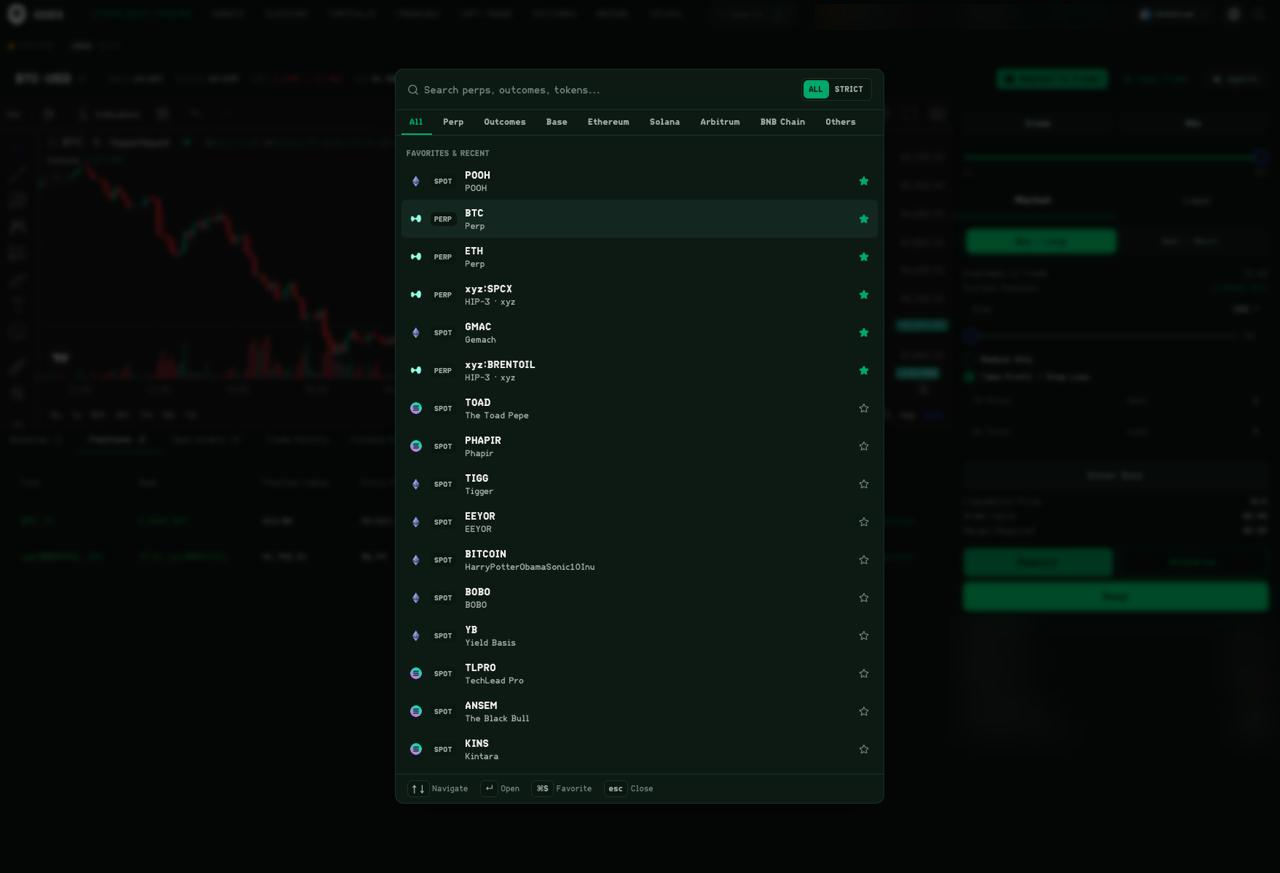
The search overlay, opened over the trading screen. The field reads Search perps, outcomes, tokens… and is where a pasted contract address goes. Top-right is an ALL / STRICT toggle, set to ALL here. Beneath the field, filter tabs run All, Perp, Outcomes, Base, Ethereum, Solana, Arbitrum, BNB Chain and Others, with All currently selected. The list below is headed FAVORITES & RECENT — each row carries a SPOT or PERP badge and a star icon on the right. The footer shows keyboard shortcuts: ↑↓ Navigate, ↵ Open, ⌘S Favorite and esc Close. What this screenshot does not show: the list visible here is saved favorites and recent activity, matched by name and ticker. That is exactly what you should not rely on for a brand-new token. Copycat tokens deliberately reuse popular tickers and names, and the contract address is the only identifier that cannot be spoofed — so paste the address into that field rather than picking a name off the list. Account balances and identifiers are redacted throughout this screenshot.
- Compare supported markets, complete quoted costs, access requirements, wallet permissions and recovery. This guide does not establish an overall performance or security ranking.
-
Manage the position against a pre-set exit
Once the swap confirms, the token sits in your self-custody GDEX wallet. Your exit rules should already exist from before you entered: a profit target, and a maximum loss you will accept.
You'll seeThe new token in your balances, with its value moving as the market does.Do nextExecute your plan when either level hits, rather than renegotiating with yourself mid-move.Be honest about the odds. New Solana tokens routinely swing 90% in either direction within an hour, and many go to zero. A pre-planned exit is what separates a trade from a gamble.
Why Contract-Address Search Matters for New Token Sniping
Compare supported markets, complete quoted costs, access requirements, wallet permissions and recovery. This guide does not establish an overall performance or security ranking.
Always source the contract address from the project's official communication — their verified Twitter or Telegram announcement, not a reply or a third-party aggregator that could be showing a fake. One wrong character in a contract address means you are buying a completely different token.
- Copy the address from the official project source, not from replies or DMs
- Double-check the first and last four characters of the address before confirming
- Use a Solana block explorer to verify the token's creation date and liquidity pool size before swapping
Fees to Expect When Sniping on GDEX Pro
Your total cost on a Solana snipe via GDEX Pro has three components. First, the GDEX swap fee of approximately 1% of the trade value. Second, Solana network transaction fees, which are typically a fraction of a cent but can be higher during congestion. Third, if you used the Apple Pay on-ramp to fund the account, that carries a roughly 2-3% fee — though you only pay that once per funding event, not per trade.
Price impact is a fourth cost that is easy to overlook. On a brand-new token with a small liquidity pool, buying even a modest amount of SOL worth of tokens can move the price against you by several percent. The GDEX interface will show you the quoted output — if the price impact looks extreme, consider reducing your position size.
Rug Pulls, Honeypots, and How to Size Positions Responsibly
The majority of brand-new tokens launched on Solana are either abandoned quickly or are outright scams. A rug pull happens when the team drains liquidity and disappears. A honeypot is a token coded so that you can buy but cannot sell — your balance shows a gain that you can never actually realize. Both are common, and neither is detectable just by looking at a price chart.
Before sniping any new token, check a few things: Does the project have a verifiable team or audit? Is the liquidity pool locked, and for how long? Are there wallet concentration warnings showing that a handful of addresses hold most of the supply? None of these checks guarantee safety, but they filter out the most obvious traps.
Position sizing is your real risk management tool. A reasonable approach for high-risk new launches is to risk only what you can afford to lose entirely — many experienced traders cap individual snipe positions at 1-2% of their total trading capital. If the token is legitimate and runs, a small position still produces meaningful returns. If it rugs, the loss is survivable.
- Never invest more in a new token snipe than you are prepared to lose completely
- Check whether liquidity is locked before buying
- Look for high wallet concentration as a red flag — a few wallets holding 50%+ of supply is dangerous
- Test a small amount first before committing a larger position
- Have a pre-set exit plan before you enter the trade
GDEX Pro Self-Custody and Why It Matters for Sniping
Published wallet documentation describes user-controlled, exportable private keys. Agent execution is separately documented as using server-side managed wallets. Review permissions, recovery and the custody model for the feature you use; self-custody does not remove every risk.
Signing in with Google or Apple means there is no seed phrase to lose or expose, which is a genuine usability advantage when you are moving quickly. The tradeoff is that you are responsible for the security of your Google or Apple account — enable two-factor authentication on whichever you use to sign in.
Frequently Asked Questions
Does GDEX Pro support Solana token sniping on mobile?
Yes. GDEX Pro runs in any browser including mobile Safari with no app download required. You can sign in with Google or Apple and trade Solana tokens from your phone.
What is the minimum amount I can use to snipe a token on GDEX Pro?
Check current transaction limits and network or provider charges before proceeding. Once SOL is in your wallet you can swap smaller amounts, though very small trades may be disproportionately affected by network fees and price impact on thin liquidity.
How does GDEX Pro find new tokens that are not yet on major lists?
You can paste a token's contract address directly into the GDEX search bar. This lets you trade tokens that have just launched and may not yet appear in curated token lists, as long as there is an active liquidity pool for the aggregator to route through.
What fees does GDEX Pro charge on Solana swaps?
GDEX Pro charges approximately 1% as a swap fee. You will also pay Solana network transaction fees, which are typically very small. If you fund via Apple Pay, there is a separate 2-3% on-ramp fee on the fiat purchase.
Is GDEX Pro a decentralized exchange?
No. GDEX Pro is a self-custody multi-chain trading terminal and swap aggregator — it routes your trades through available liquidity sources but is not itself a DEX. Your funds remain in your self-custody wallet throughout.
Can I lose all my money sniping new Solana tokens?
Yes, absolutely. New token launches carry extreme risk including rug pulls, honeypots, and rapid price collapse. You should only allocate money you can afford to lose entirely, and always verify contract addresses and liquidity before trading.
Bottom Line
GDEX Pro gives you a fast, browser-based path to snipe new Solana tokens using contract-address search and Solana swap routing — all without giving up self-custody or downloading an app. The workflow is genuinely quick, and the Apple Pay on-ramp removes the friction of pre-funding. That said, the risk on brand-new token launches is severe regardless of what platform you use: rugs and honeypots are common, and no trading terminal can protect you from a bad token. Use small, pre-planned position sizes and do your contract-address verification before you swap. No KYC is required for GDEX signup-to-trade. Third-party on-ramp providers may require identity verification and apply eligibility restrictions.
Self-custody. $50 minimum. No KYC.